What Microsoft Dynamics 365 Finance Delivers For Invoicing
How Microsoft Dynamics 365 Finance Data Reaches E-Invoicing
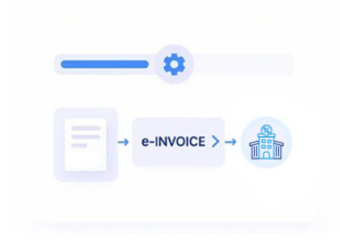
- Select Eligible Customer Transactions: Identify finalized invoices and receivable transactions requiring electronic invoice processing.
- Retrieve Finance Record Details: Collect customer, tax, currency, dimensions, amounts, and document references from Dynamics 365 Finance.
- Construct Structured Invoice Information: Organize applicable financial fields into structured data required for electronic invoice preparation.
- Examine Transaction Completeness: Review configured invoice information for missing or inconsistent values before electronic processing.
- Submit Through Configured Channels: Route validated invoice content through the designated electronic invoicing workflow.
- Register Processing Responses: Capture available exchange information and relate results to originating finance transactions.
What Advintek Adds To Microsoft Dynamics 365 Finance
Advintek extends Microsoft Dynamics 365 Finance with structured invoice preparation, configurable data checks, electronic exchange, and processing visibility for Norwegian finance operations.
- Transforms Finance Transactions Into Invoice Structures
- Examines Tax And Customer Information
- Coordinates Digital Invoice Exchange
- Links Processing Events With Documents
Why Microsoft Dynamics 365 Finance Fits Norwegian Invoice Processing
- Finance-Centric Architecture: Microsoft Dynamics 365 Finance brings together receivables, taxation, accounting, customer data, and financial dimensions within one connected environment.
- Receivables Transaction Depth: Detailed customer transaction records provide a strong source for preparing electronic invoices from established finance processes.
- Tax Configuration: Built-in tax functionality provides relevant information that can participate in invoice preparation and downstream electronic processing.
- Multi-Entity Operations: Financial dimensions and organizational structures can provide additional context for invoice transactions across complex business environments.
- Norwegian Regulatory Considerations: Advintek can configure invoice workflows around applicable Norwegian requirements and relevant considerations associated with Skatteetaten.
- Accounting Traceability: Electronic processing information can be connected with originating financial documents, supporting reconciliation and invoice investigation.
What Microsoft Dynamics 365 Finance Integration Functions Can Deliver
Receivables Data Structuring
Converts relevant Microsoft Dynamics 365 Finance receivables information into structured e-invoice data.
Tax And Field Verification
Reviews configured financial, customer, and tax information before electronic invoice processing begins.
Document Status Monitoring
Associates processing events with relevant Microsoft Dynamics 365 Finance documents for finance team visibility.
How Microsoft Dynamics 365 Finance Supports Norwegian E-Invoice Requirements
Microsoft Dynamics 365 Finance supplies financial and receivables information, while Advintek prepares applicable invoice data for structured Norwegian electronic processing.
- References Relevant Finance Transactions
- Verifies Norwegian Invoice Data Elements
- Structures Tax And Billing Information
- Documents Electronic Exchange Activity
Strengthen Norwegian Finance Compliance
Advintek connects Microsoft Dynamics 365 Finance with structured Norwegian e-invoicing workflows across billing and receivables operations.
Create greater control across digital invoice processing and financial records.
Ready e-Invoice System
Frequently Asked Questions Microsoft Dynamics 365 Finance e-Invoicing Norwegian
Can Microsoft Dynamics 365 Finance handle different customer invoice scenarios?
Microsoft Dynamics 365 Finance supports varied accounts receivable transactions, including standard customer billing and other configured financial document scenarios. Advintek can process applicable transaction information according to the integration design, allowing organizations to establish structured electronic invoice workflows around their existing finance processes.
How does tax information from Microsoft Dynamics 365 Finance enter e-invoicing?
Relevant tax information maintained within Microsoft Dynamics 365 Finance can participate in electronic invoice preparation when included in the integration. Advintek can map applicable tax fields alongside customer, transaction, and financial information before applying configured checks and processing the resulting invoice.
Can financial dimensions remain associated with electronic invoices?
Where financial dimensions are included in the integration design, applicable dimension information can provide additional context around invoice transactions. Advintek can process relevant fields while Microsoft Dynamics 365 Finance continues maintaining the organizational, accounting, and financial structures associated with the underlying transaction.
How does the integration support credit and debit documents?
Applicable credit and debit document scenarios can be included when supported by the organization’s Microsoft Dynamics 365 Finance configuration and electronic invoicing requirements. Advintek can structure relevant document information for processing, allowing different billing adjustments to follow appropriately configured electronic invoice workflows.
What does Microsoft Dynamics 365 Finance retain after e-invoice processing?
Microsoft Dynamics 365 Finance continues maintaining its underlying customer, receivables, accounting, tax, and transaction records. Advintek handles the configured electronic invoice processing layer, while available exchange information can be associated with relevant financial documents to support review, reconciliation, and exception handling.