

Why Infor M3 Users Trust Advintek
How INFOR M3 Moves Through Norway
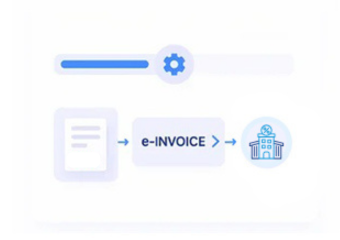
- ERP Invoice Intake: Relevant billing records from INFOR M3 enter Advintek’s electronic invoicing environment.
- Content Examination: Invoice information is assessed before the document moves into structured preparation.
- Digital Representation: Approved billing content is arranged into machine-readable electronic invoice data.
- Destination Preparation: Recipient details are considered before the invoice enters electronic exchange.
- Electronic Document Delivery: Prepared invoices proceed through suitable supported exchange channels.
- Outcome Recording: Processing responses are retained to help teams review document outcomes.
What INFOR M3 E-Invoicing Integration Adds
INFOR M3 continues handling enterprise billing activities while Advintek extends those records into a connected electronic invoice process.
- Brings INFOR M3 invoices into processing
- Reviews billing information before preparation
- Creates structured electronic invoice documents
- Maintains exchange response information
Why INFOR M3 Teams Use Connected E-Invoicing
- ERP-Centered Invoice Creation: Teams can continue creating and managing billing records within INFOR M3 while Advintek handles the electronic processing activities around them.
- Better Billing Information Flow: Relevant invoice content moves through defined stages, reducing the need to repeatedly transfer information between disconnected processes.
- Structured Document Readiness: Invoice records are organized into machine-readable electronic structures before entering the applicable exchange workflow.
- Recipient Preparation: Customer and recipient information is considered as part of the document journey before electronic delivery takes place.
- Operational Invoice Visibility: Processing events give finance teams a clearer view of documents moving through preparation and exchange.
- Norwegian Workflow Compatibility: The connected process supports applicable Norwegian electronic invoicing activities while businesses retain their established INFOR M3 environment.
What Infor M3 Gets for Norway E-Invoicing
Exception Resolution
Check essential document information carefully before each invoice enters Norwegian electronic exchange workflows.
Centralized Monitoring
Follow invoice activity efficiently across connected Norwegian e-invoicing processing and exchange stages.
Compliance Updates
Spot documents requiring additional information, correction, or attention before successful Norwegian invoice processing.
Why INFOR M3 Works For Norwegian Businesses
Advintek helps INFOR M3 users introduce structured electronic invoicing alongside existing enterprise billing, finance, and operational workflows in Norway.
- Preserve established INFOR M3 billing processes
- Prepare enterprise invoices for exchange
- Organize electronic invoice information
- Monitor processing results centrally
With Connected Norwegian E-Invoicing
Advintek extends INFOR M3 invoice processing into structured Norwegian electronic exchange.
Keep enterprise billing connected throughout the process.
Ready e-Invoice System
FAQs Infor M3 and Norway E-Invoicing
1. How can INFOR M3 invoice records enter an electronic invoicing workflow?
Relevant invoice records created through INFOR M3 can be brought into Advintek’s connected processing environment. The workflow can review invoice information, organize structured electronic data, prepare recipient details, support digital exchange, and retain processing responses for operational follow-up.
2. Can INFOR M3 customer and billing information support invoice preparation?
Yes. Relevant customer and billing information available within INFOR M3 can contribute to electronic document preparation. Advintek can organize applicable details into structured invoice information while considering recipient data before the document moves toward an appropriate electronic exchange route.
3. What happens between INFOR M3 invoice creation and electronic delivery?
After relevant invoice information enters the connected workflow, it can pass through content review, structured data preparation, recipient coordination, and electronic exchange. Processing responses can then be retained, giving teams information about the document’s progress and resulting outcome.
4. Can businesses keep INFOR M3 as their primary ERP?
INFOR M3 can remain the established ERP environment for enterprise billing and related operations. Advintek works around relevant invoice information by adding electronic document preparation, exchange support, and processing visibility, allowing businesses to retain familiar ERP processes.
5. How can finance teams follow INFOR M3 invoice processing?
Processing events and exchange responses can provide finance teams with visibility into documents after they enter the electronic invoicing workflow. This helps users identify invoice progress, review outcomes, and recognize documents that may require additional information or attention.