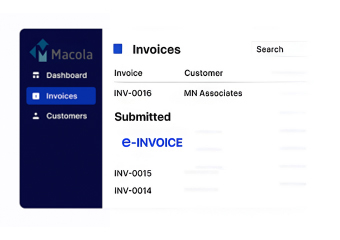
How Macola Strengthens Invoice Management
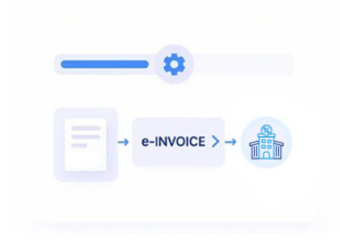
Inside A Macola-Powered Invoice Journey
- Choose Completed Sales Activity: Identify finalized sales and billing transactions suitable for electronic invoice preparation.
- Assemble Billing Information: Collect customer, product, order, tax, and accounting details from relevant Macola records.
- Convert ERP Transaction Fields: Transform applicable Macola information into structured electronic invoice data for processing.
- Screen Invoice Information: Examine prepared invoice data for missing or inconsistent information before electronic handling.
- Execute Invoice Transmission: Route validated invoice information through configured electronic invoicing channels and processing workflows.
- Document Exchange Results: Capture available responses and connect resulting information with corresponding Macola invoice records.
Where Advintek Fits Into Macola
Advintek adds an electronic invoicing layer around Macola, connecting ERP billing information with structured preparation, validation, transmission, and response workflows for Norway.
- Connects Macola billing with e-invoicing
- Structures invoice information for exchange
- Detects gaps in billing records
- Links responses with invoice activity
Why Macola Is Ready For Norwegian E-Invoicing
- Accounting-Centric ERP Structure: Macola contains financial and billing information that can support electronic invoice preparation without changing the ERP’s fundamental accounting role.
- Sales Information Continuity: Sales transactions provide useful source information for generating invoices while preserving relevant business context throughout processing.
- Customer and Order Context: Connected customer and order records can supply information required for accurate invoice preparation and structured electronic documentation.
- Norwegian Workflow Configuration: Advintek can configure processing around applicable Norwegian invoicing requirements and relevant considerations associated with Skatteetaten.
- Invoice Quality Screening: Configurable checks can identify missing, inconsistent, or unsuitable information before an invoice advances through electronic processing.
- Financial Record Association: Electronic invoice activity can be related to originating Macola records, supporting finance teams during review and exception investigation.
Macola Integration Functions For Finance Teams
ERP Field Conversion
Converts relevant Macola accounting and billing fields into structured electronic invoice information.
Invoice Rule Checking
Examines configured invoice information against required data rules before electronic processing begins.
Exchange Event Recording
Records electronic invoice exchange events alongside related Macola billing transactions for review.
How Macola Meets Norwegian Invoice Needs
Macola supplies sales and accounting information, while Advintek prepares, verifies, and processes structured invoices according to applicable Norwegian invoicing requirements.
- Selects Qualifying Macola Billing Records
- Checks Required Norwegian Invoice Information
- Produces Structured Electronic Invoice Files
- Documents Invoice Exchange Activity
Start Norwegian E-Invoicing With Macola
Advintek connects Macola with structured Norwegian invoice workflows designed around efficient digital finance operations.
Simplify invoice handling through a connected ERP environment.
Ready e-Invoice System
Frequently Asked Questions Macola ERP E-Invoicing Norwegian
Which Macola business processes can connect with e-invoicing?
Macola sales, billing, customer, order, accounting, and tax information can support electronic invoice preparation. Advintek can connect relevant records with structured processing workflows, allowing businesses to use existing ERP information while applying configured validation and electronic exchange procedures to eligible Norwegian invoices.
What happens when invoice information is incomplete?
Configured validation can identify missing, inconsistent, or unsuitable information before an invoice proceeds through electronic processing. This gives finance teams an opportunity to review source records and address information issues within the applicable workflow before electronic invoice exchange takes place.
Can Macola invoice records be connected with processing events?
Yes. Available processing events and responses can be associated with corresponding Macola invoice records. This relationship gives finance users additional context when checking invoice activity, reviewing exceptions, or investigating processing outcomes against the original sales and accounting information.
What does Advintek add beyond Macola's standard capabilities?
Advintek provides a dedicated electronic invoicing layer around relevant Macola processes. It can handle structured data preparation, configurable validation, electronic processing, and response management, extending existing ERP workflows without requiring Macola to replace its established accounting and business management functions.
How does Macola support finance teams during invoice review?
Macola provides access to the underlying sales, customer, billing, and accounting information associated with invoices. When connected with Advintek, processing information can be reviewed alongside those ERP records, helping finance teams investigate discrepancies and understand the status of electronic invoice activities.